Official Identity System of RCCG DTCE Junior Church Global
International Teacher's ID System · TeachVerify

ONE LEDGER.EVERY CONTINENT.

TeachVerify is the International Teacher's Identity Card system for the Directorate of Teens & Children Education — spanning 12 continents and 198+ countries, from the first day a coordinator registers a teacher, through review, printing and activation, to the moment anyone, anywhere, scans a card and gets a straight answer: valid, expired, or suspended.

12Continents
198+Countries in Reach
5 + 7Nigeria + International
12Continents
5 continents — Nigeria
7 continents — International
NG NG UK UK CA CA KE KE US US AU AU ZM ZM 🇪🇺 EU 🌏 ASIA
One trusted card, recognized across 198+ countries.
SUPER ADMIN
CONTINENTAL
ZONAL
REGIONAL
PROVINCIAL
Every approval traces back through an unbroken chain of command — no one acts outside their own scope.
LIVE VERIFICATION LEDGER · SECURE SESSIONS · FULL AUDIT TRAIL
RCCG · DTCE GLOBAL · TEACHVERIFY · CHARTERED AUTHORITY ·
DTCE Global Seal
NigeriaNigeria
CanadaCanada
United KingdomUnited Kingdom
🇪🇺Europe
🌏Asia
ZambiaZambia
KenyaKenya
USAAmerica
AustraliaAustralia
0
Teachers Registered
0
Cards Approved
0
Cards Activated
542
Coordinators Serving
6/12
Continents Reached
198+
Countries In Reach
● Live figures from the TeachVerify ledger, updated in real time.
Entry No. 01 — Right Now, System-Wide

The two clocks every coordinator watches

Printing and onboarding only happen inside scheduled windows. Here's exactly how much time is left — live, down to the second.

Print Window
No Window Scheduled
Closed
--Days
:
--Hrs
:
--Min
:
--Sec
No print window is scheduled at the moment — check back soon.
Registration Window
No Window Scheduled
Closed
--Days
:
--Hrs
:
--Min
:
--Sec
No registration window is scheduled at the moment — check back soon.
Entry No. 02 — Why TeachVerify Exists

Safeguarding every teacher who serves in DTCE Junior Church

RCCG's Directorate of Teens & Children Education (DTCE) Global entrusts thousands of teachers, facilitators and coordinators with the spiritual formation of children — across 12 continents and 198+ countries, from Nigeria's own zones and regions to every international province beyond. TeachVerify exists so that every card in circulation is real, current, and accountable — protecting the children in the classroom and the integrity of everyone who has genuinely earned their place at the front of it.

"Suffer the little children to come unto me, and forbid them not: for of such is the kingdom of God." — Mark 10:14
Governance Hierarchy
Every registration, review and card follows one chain of custody — the same hierarchy the whole portal is built around, so accountability is never ambiguous.
Super Admin
→
Continental
→
Zonal
Regional
→
Provincial / International
Super Admin oversees the entire global ledger. Continental, Zonal and Regional coordinators review and approve strictly within their own scope. Provincial coordinators — inside Nigeria via the Nigeria Province Ledger, or abroad via the International Ledger — register the teachers who actually stand in front of the children.
Entry No. 03 — The Full Card Lifecycle

From registration to a verified card in someone's hand

Every teacher's card moves through the same seven checkpoints — nothing skips the queue, and nothing goes live without a human decision behind it.

01
Register
Coordinator submits the teacher's details and a passport-style photo, scoped to their own province.
02
Review
A gender-aware checklist is worked through by the assigned reviewer — pass, fail, or request correction.
03
Approve & TVN
A unique Teacher Verification Number is generated the instant a record is approved — it never changes again.
04
Print Confirmed
Once the physical card is printed, a coordinator confirms it — starting a 7-day activation window.
05
Activate
Name confirmation, an emailed one-time code, then a final confirmation — three checks before the card ever goes live, starting the real validity clock.
06
Verify Anytime
Anyone can scan the QR code or type the TVN to get a live valid / expired / suspended verdict — no login needed.
07
Renew or Retire
Cards renew before they expire, or — if lost, stolen, or misused — are suspended and reissued under a brand-new TVN.
Entry No. 04 — See The Actual Card

Every teacher gets the same trusted card

This is the live template pulled straight from the card design settings — the exact front and back artwork, field positions and security seal every approved teacher's card carries.
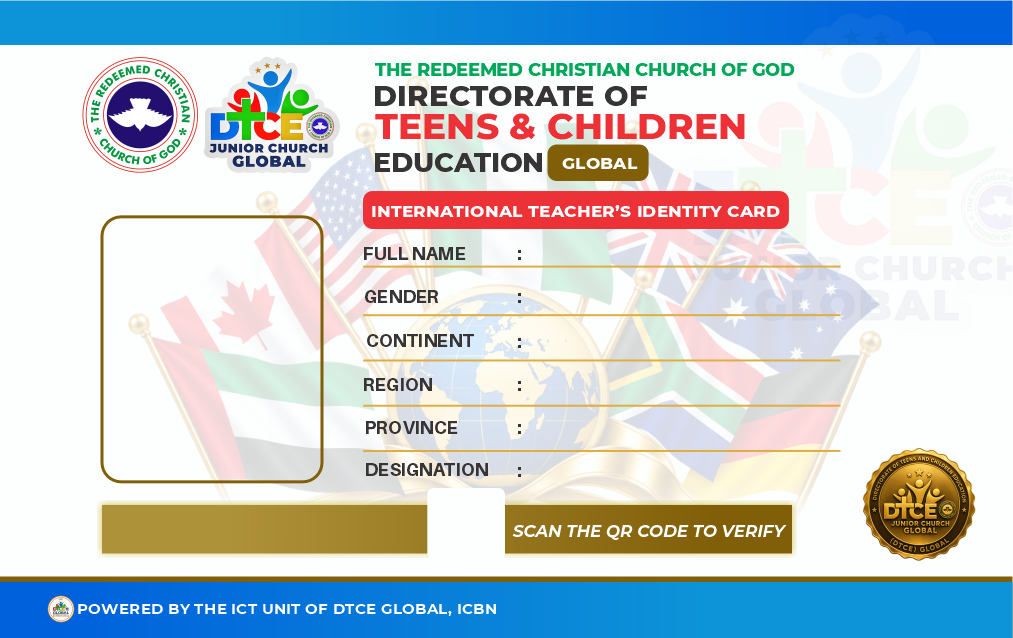
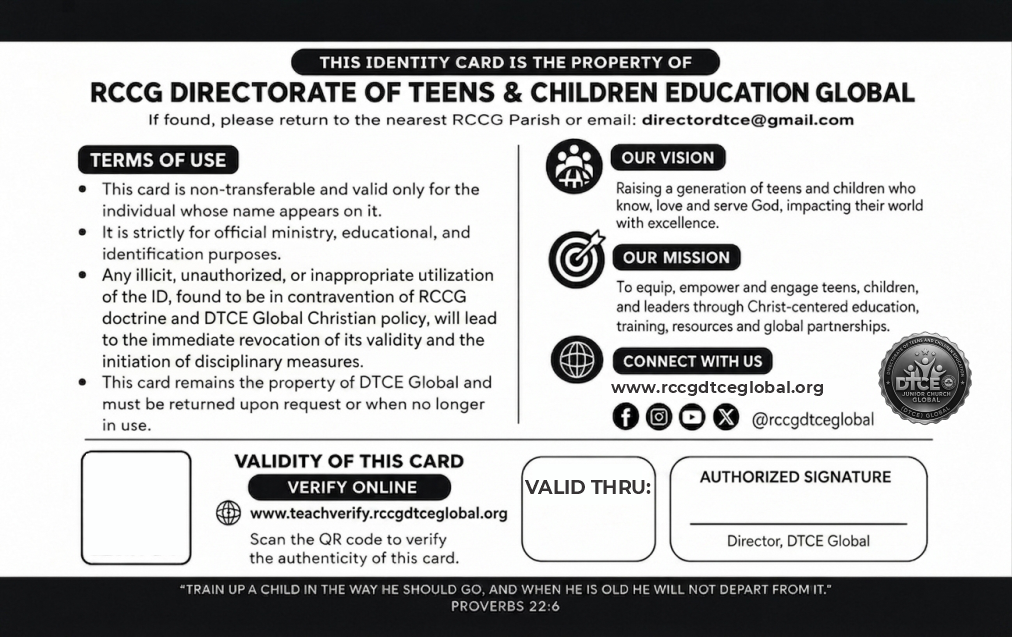
Live Card Template Sample Preview
SPECIMEN  ·  NOT VALID FOR SERVICE
Card front
Jane A. Okoro
Female
Continent 12
Region 21
OYO PROVINCE 11
Lead Instructor
DTCE26120421 0007
Card back
SPECIMEN  ·  NOT VALID FOR SERVICE
DEC 2026
100%
This is the exact template issued to every approved teacher — tap or click to flip, use the zoom controls to inspect field placement.
Protected preview — saving & copying disabled
Why Show It Publicly

One recognizable card, everywhere DTCE Global serves

Showing the real design here means ushers, parents and security teams anywhere in the world already know exactly what a genuine card should look like — before they ever scan one.

Every field, exactly where it prints
Photo, flag, name, role, continent, region, province, TVN, QR and barcode — positioned from the same layout the print engine uses.
A unique TVN printed left on the front
Every card carries its own Teacher Verification Number in plain sight on the front — a unique code tied to that one teacher for life, so anyone can quote it when verifying instead of relying on the QR alone.
A barcode built to genuine scanning standards
The Code128 barcode alongside the TVN follows the real industry spec, so it scans reliably with standard barcode readers — not just as a decorative stripe.
Security seal on both faces
The DTCE Global seal sits on the card itself as a visual hologram cue, alongside the Director, DTCE Global signature on the back.
Cryptographically signed QR codes
Each card's QR carries the teacher's details directly — readable offline by any scanner — sealed with a hidden digital signature that only DTCE Global's system can produce, so a fabricated card can never pass as genuine.
Two card designs, same standard
The preview cycles between fictional teachers across continents — including a swap between the Nigeria artwork and the International artwork — so this page never displays one static, screenshot-able "real" card.
A genuine card is easy to recognize precisely because a fake one never quite gets every detail right.
Entry No. 05 — Built For Real Accountability

Everything a global card program actually needs

Every feature below already runs inside TeachVerify today — not a roadmap, the live system.

Continent → Province Hierarchy
Super Admin, Continental, Zonal, Regional and Provincial roles, each strictly scoped to their own slice of the ledger — nobody sees, edits, or approves outside their lane.
Public QR Verification
Every printed card carries a scannable code. Anyone — security, ushers, parents — gets an instant, honest verdict with no account required.
7-Day Activation Window
A printed card must be activated by its teacher within 7 days, or it auto-suspends — closing the gap between "printed" and "in the wrong hands."
Email-Verified Activation
Activating a card is a three-step check — name confirmation, a one-time code emailed to the address on file, then a final explicit confirmation — with attempt limits at every step.
Live Print & Registration Windows
Downloads and new registrations only open during scheduled windows — a live countdown (see above) shows exactly when each one opens or closes.
Suspend, Reinstate & Reissue
A card can be suspended instantly for a Terms of Use violation, reinstated once resolved, or permanently retired and reissued under a fresh TVN if lost or stolen.
Full Audit Trail
Every review, print confirmation, suspension, export and login is logged with actor, action, and reason — nothing happens off the record.
Delegated Registration Links
A coordinator with a large batch can generate a time-boxed link so an assistant registers on their behalf — fully attributed, fully revocable.
Visual Card Template Designer
Front and back artwork, every text field, QR code and signature is positioned with a live drag-and-resize editor — with instant sample-data preview.
Reports & Exports
One-click CSV exports for filtered records, expiring-soon cards, review backlog, coordinator activity, and a print-ready executive summary.
Lost & Stolen Reporting
Anyone scanning a card can flag it lost or stolen right from the public page — queued for a super admin to review and suspend if genuine.
Nigeria + International Ledgers
Two purpose-built portals — a direct ledger for Nigeria's 5 continents, and an approval-gated ledger for coordinators serving anywhere in the other 7.
Bank-Grade Session Security
Hashed passwords, CSRF-protected forms, rate-limited lockouts, rotating "remember me" tokens, and duplicate-teacher detection at registration.
Signed, Offline-Verifiable QR Codes
Every card's QR embeds the teacher's details directly, sealed with a hidden digital signature only DTCE Global's system can generate — readable and checkable even with no internet connection.
High-Reliability QR & Barcode Printing
QR codes use strong error correction to stay scannable even after a card is scratched or worn, and every barcode is generated to genuine Code128 standards for consistent, reliable scans.
Bulk Actions at Scale
Approve, confirm-print, renew, or export hundreds of records in one motion — the same scope locks and audit trail apply whether a coordinator acts on one record or a thousand.
Coordinator Accountability
Leadership can see exactly who's reviewing, printing and renewing — and who hasn't logged an action in 30 days — without waiting for a status meeting.
Entry No. 06 — Nothing Happens Off The Record

A ledger you could actually audit

Every review, approval, print confirmation, export, suspension and sign-in is written to an immutable log with who, what, when, and why. This is what that log looks like — illustrative rows below, since real coordinator activity stays inside the Command Hub.

2 min ago
Regional Coordinator confirmed a card printed
Continent 12 / Region 21
11 min ago
Zonal Coordinator approved a teacher record — TVN generated
Continent 9 / Zone 3
38 min ago
Super Admin exported an expiring-cards report
Global
1 hr ago
Provincial Coordinator registered a new teacher
International / America 2
3 hr ago
Continental Coordinator reviewed a batch — 14 records
Continent 4
Illustrative excerpt — no real teacher or coordinator data is shown on this public page.
195
Logged Actions, Last 30 Days
Reviews, approvals, print confirmations, downloads, renewals, and every suspend/reinstate/reissue — each one attributed to a real account.
4
Coordinators With Logged Activity
A super admin can always see who's actively reviewing, and who hasn't taken an action in 30 days.
39
Sessions Logged, Last 30 Days
Every sign-in records IP address and device — a separate trail from the action log, for spotting anything unfamiliar.
Entry No. 07 — Leadership Doesn't Wait For A Meeting

The reports a global program actually runs on

Four report types, always current, so a leadership review is a click instead of a week of chasing coordinators for numbers.

Executive Summary
A single printable page for leadership review — pipeline health, card lifecycle, global coverage and coordinator oversight, generated on demand.
Expiring-Soon
Every activated card due within 30, 60 or 90 days, so provinces can plan renewals before a teacher's card lapses.
Review Backlog
Records stuck in review past 7, 14 or 30 days — the queue leadership is most likely to need to unblock.
Coordinator Activity
Every coordinator's logged actions, and who hasn't taken one in 30 days — visibility into where oversight is thin.
Registrations vs. Approvals — Last 14 Days
Live figures from the TeachVerify ledger
Registrations Approvals
Entry No. 08 — When A Card Goes Missing

Protect & respond, without waiting on an office

A lost or stolen card is a live liability the moment it leaves the right hands. This is the path from "someone noticed" to "the card can never verify again."

1
Anyone reports it — no login required
From the public verification page, anyone can flag a specific card as lost or stolen and leave contact details, straight from the QR scan.
2
Super admin suspends it, immediately
The report and the suspension happen together — the card stops verifying as valid the moment it's actioned, with a reason always on file.
3
Reissue mints a brand-new TVN
The old number is retired for life and can never verify again. The teacher gets a fresh TVN and goes through Confirm Print + Activation again, exactly like a new card.
Protect & Respond
Public reporting → suspension → reissue
Suspension is instant and reversible if the report turns out to be a false alarm — Reinstate restores the card exactly as it was. Reissue is deliberate and permanent, reserved for when the physical card is genuinely compromised.
0
Reports Awaiting Review
0
Reports Resolved
Entry No. 09 — Find Your Door

Four ways into TeachVerify

Every role has its own themed portal — pick the one that matches what you do, or use the Sign In menu at the top of the page.

Review & Approval Console
Command Hub
The central console for reviewing, approving, printing, activating, suspending and reporting on — across every continent.
Super Admin Continental Zonal Regional
Nigeria · Direct Access
Province Ledger
Register teachers directly into your Nigerian province, track their card status, and issue delegated links for large batches.
Provincial Coordinator
Outside Nigeria · Approval Required
International Ledger
For coordinators serving anywhere outside Nigeria. Registration requires one-time approval from your regional coordinator.
International Coordinator
Public · No Login Needed
Verify a Card
Scan a card's QR code or type its TVN to get an instant status — and activate a freshly printed card here too.
Anyone
Entry No. 10 — Trust By Design

Security that matches the weight of the work

This system protects the identity of everyone in front of a classroom of children — it's built with that in mind, end to end.

CSRF Protection
Every mutating form is bound to a session token, blocking forged cross-site requests.
Hashed Credentials
Passwords are never stored in plain text; sessions regenerate on every sign-in.
Lockout After 5 Attempts
Repeated failed logins temporarily lock an account instead of allowing endless guesses.
Immutable Audit Log
Every approval, suspension, export and sign-in is permanently recorded with who, what and why.
Duplicate Detection
Registration cross-checks phone, email, national ID and name+DOB before a second record is ever created.
Photo Integrity Checks
Every uploaded photo is validated for portrait orientation, aspect ratio and minimum resolution.
Row-Level Scope Locking
A coordinator can never edit, approve or download a record outside their own continent, zone, region or province.
Time-Boxed Windows
Print, registration, and delegated links all expire on their own — nothing stays open by accident.
Digitally Signed Card Data
Every card's QR payload is sealed with a cryptographic signature unique to DTCE Global — a copied or hand-typed forgery will never produce a matching seal.
One-Time Email Codes
Activation requires a fresh 6-digit code sent to the teacher's own registered email — never revealed on-screen, and locked out after repeated wrong attempts.
Entry No. 11 — Global Reach

12 continents, 198+ countries within reach

One ledger, spanning every continent DTCE Global serves — 5 inside Nigeria's own zones and regions, and 7 international continents beyond it.

12Total Continents Worldwide
5Continents Inside Nigeria
7International Continents
198+Countries Within Reach
Nigeria Coverage
5
Continents (of 5)
16
Zones
72
Regions
541
Provinces
International Coverage
1
Continents (of 7)
1
Countries
1
Regions
1
Provinces
Entry No. 12 — Keeping Every Print Accounted For

How download licenses keep each region accountable

An approved card doesn't download for free forever — every region holds its own balance of download licenses, visible live, and tops it up itself the moment it runs low.

1
One license, one first download
Each approved teacher's card needs one license the first time it's downloaded for printing. After that, the same teacher's card stays free to re-download as many times as needed.
2
Purchased, Used and Remaining — always visible
Your region's coordinator sees the exact balance at a glance on the dashboard — never a surprise "why can't I download this" moment.
3
Top up instantly, no waiting on head office
When a region needs more, its coordinator pays securely, straight to RCCG DTCE Junior Church Global, right from the dashboard — licenses activate the moment payment is confirmed, with no manual approval step in between.
Licenses & Billing
Self-service, per-region — paid directly to RCCG DTCE Junior Church Global
This lives inside each coordinator's own dashboard — Regional Coordinators manage it for their own region, and Super Admin can top up any region directly after an offline payment (e.g. a bank transfer). Every payment goes straight to RCCG DTCE Junior Church Global, processed securely, and is tied to a signed-in, scoped account — never a public purchase page.
1:1
License Per First Download
∞
Free Re-downloads After
Entry No. 13 — Common Questions

Before you sign in

What is a TVN?
A Teacher Verification Number — a unique identifier generated the moment a registration is approved. It never changes for that teacher, even through a later renewal.
How do I know if a print or registration window is open?
Scroll up to "The two clocks every coordinator watches" — it shows both windows live, with a countdown to whenever the current status changes.
I just received my printed card — what do I do?
Go to Verify a Card, enter your TVN, and confirm your full name exactly as submitted at registration. We'll then email a one-time 6-digit code to your registered address — enter it to confirm it's really you, then a final tap activates the card. Only start this once the physical card is in your hand: activating starts your validity period immediately, and the action can't be undone by you afterward.
My card doesn't scan as valid — why?
It may be awaiting print, awaiting your activation, expired, or suspended. The verification page explains exactly which one, and what to do next — usually contacting your regional or zonal coordinator.
I'm a coordinator outside Nigeria — which portal do I use?
Use the International Ledger (also in the Sign In menu at the top of the page). New accounts there require one-time approval from a coordinator with authority over your region before you can sign in.
My card was lost or stolen — what now?
Open the card's verification page and use "Report this card lost or stolen" — see Protect & Respond above for exactly what happens next. A super admin reviews the report, suspends the card so it can't be misused, and arranges a reissue with a brand-new TVN.
Where can I find step-by-step guides?
Open the Documentation page for walkthroughs covering registration, review, printing, activation and verification.

Ready to verify, register, or review?

Whichever seat you hold in DTCE Global's structure, your door into TeachVerify is one click away.